Geographical-XGBoost documentation
An implementation of XGBoost for Geographical Anlaysis.
Geoxgboost is a Python library that implements the Geographical-XGBoost (G-XGBoost) algorithm for spatially local regression. G-XGBoost belongs to the family of Spatial Machine Learning algorithms and modifies the standard XGBoost algorithm (extreme gradient boosting trees) to handle spatial data and spatial heterogeneity.
G-XGBoost:
Applies the concept of geographically varying models in XGBoost: This means it creates local models that analyze data within a specified neighborhood using spatial weights.
Creates an ensemble of the global and local models: It utilizes both global and local models for training, validation, and prediction, leading to improved model accuracy.
Calculates local feature importance using spatial weights through the gain function.
Beyond being a predictive tool, G-XGBoost is also a valuable exploratory tool for identifying spatial heterogeneity. It evaluates how spatially weighted feature importance varies across different locations, enhancing the model’s interpretability. The theoretical presentation, mathematical formulation, and experimental results of G-XGBoost, across six regression models and six benchmark datasets, can be found in this paper: [Insert Paper Citation Here].
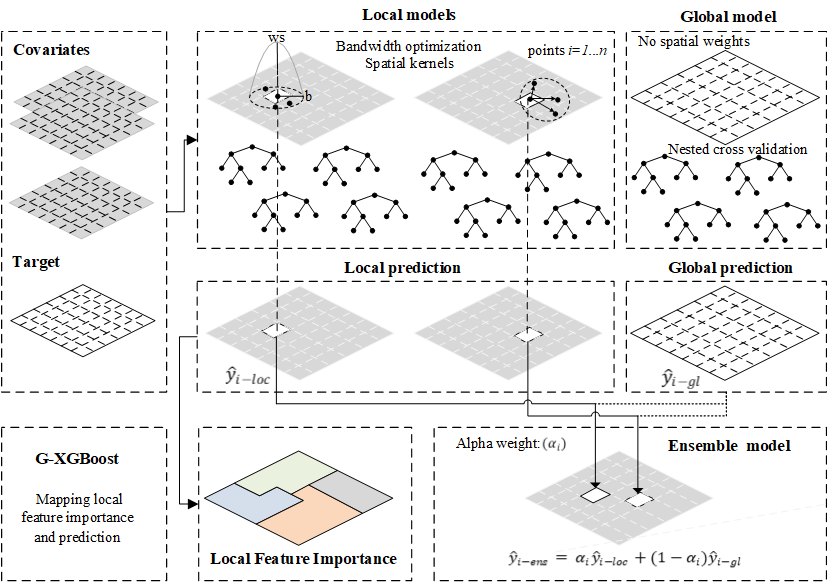
Figure: G-XGBoost ensemble for spatially local regression. A different sub-model is built for every spatial unit (i), including only its neighboring units. The optimal bandwidth value (either distance or number of nearest neighbors) is defined by minimizing the cross validation criterion. Hyperparameters are selected using grid search through nested cross validation of the global model. G-XGBoost results from the ensemble (y_ens) of global (y_gl) and local (y_loc) models using the alpha weight (α) regularization hyperparameter. Feature importance is produced for the local models.
Installation
pip install geoxgboost
Tutorial
A comprehensive tutorial is available on GitHub, guiding users through the entire process, from project setup in PyCharm to running the demo. No prior Python knowledge is required.
The tutorial provides step-by-step instructions on how to:
Download and install PyCharm to create the Demo project.
Download the necessary data and install the geoxgboost library.
Run the geoxgboost algorithm.
Extract outputs in Excel format.
Understand the content of each output file.
Like any machine learning algorithm, G-XGBoost requires hyperparameter tuning. Guidelines for tuning are provided in the accompanying paper. The demo utilizes predefined hyperparameter values for convenience. However, users are encouraged to experiment with different hyperparameter combinations to optimize model performance. Geoxgboost facilitates hyperparameter tuning through a built-in function called create_param_grid, enabling efficient grid search. The functions, parameters, and examples of the geoxgboost package are available in https://geoxgboost.readthedocs.io/en/latest/
Demo data
Boston housing dataset
Download data from: https://github.com/geogreko/DemoGXGBoost/tree/main
The following files are included in the GitHub repository:
Coords.csv: Coordinates of the spatial units.
Data.csv: Dependent and independent variables.
DataDescription.xlsx: Data description.
GXGB_call_demo.py: Python script to analyze the Boston housing dataset.
PredictCoords.csv: Coordinates of the spatial units for prediction.
PredictData.csv: Values of the independent variables for the spatial units where predictions will be made.
Tutorial_geoxgboost.pdf: A guide for using the demo.
How to cite
Grekousis G, (2025). Geographical-XGBoost: A new ensemble model for spatially local regression based on gradient-boosted trees. Journal of Geographical Systems. https://doi.org/10.1007/s10109-025-00465-4
Geoxgboost is freely available provided the above paper is cited.
geoxgboost package
geoxgboost module
This module implements Geographical-XGBoost for spatially local regression.
The module contains the following functions:
create_param_grid - Returns the grid of up to three hyperparameters.
nestedCV - Returns the optimized hyperparameters’ values and generalization error of XGBoost.
global_xgb - Returns the global XGBoost model.
optimize_bw - Returns the optimized bandwidth value.
gxgb - Returns geographical XGBoost, local prediction and related statistics.
predict_gxgb - Returns prediction in unseen data.
- geoxgboost.geoxgboost.create_param_grid(Param1, Param1_Values, Param2=None, Param2_Values=None, Param3=None, Param3_Values=None)[source]
Creates a grid of up to three hyperparameters for tuning.
Examples
>>> Param1='n_estimators'
>>> Param1_Values = [100, 200, 300,500]
>>> Param2='learning_rate'
>>> Param2_Values = [0.1, 0.05,0.01]
>>> Param3='max_depth'
>>> Param3_Values = [2,3,4,6]
>>> create_param_grid(Param1,Param1_Values,Param2,Param2_Values,Param3,Param3_Values)
- Parameters:
Param1 – 1st hyperparameter name e.g., ‘n_estimators’
Param1_Values – values for search e.g., [100, 200, 500]
Param2 – 2nd hyperparameter name e.g., ‘learning_rate’. Default=None.
Param2_Values – values for search e.g., [0.1, 0.05,0.01]. Default=None.
Param3 – 3rd hyperparameter name e.g., ‘max_depth’. Default=None.
Param3_Values – values for search e.g., [2,3,4,6]. Default=None.
- Returns:
param_grid. Can be used in nestedCV function to fine tune hyperparameters
Change the argument of Param1, Param2, or Param3 with other hyperparamters available to tune XGBoost, such as: subsample, colsample_bytree, lambda, alpha etc.
For example:
Param1= ‘subsmample’
Param1_Values = [0.5, 0.7, 0.9]
A complete list of hyperparameters can be found here: https://xgboost.readthedocs.io/en/stable/parameter.html
Tip: This function can be iteratively repeated with different sets of hyperparameters. See an example in GXGB_call_demo.py at the DemoGXGBoost in GitHub.
- geoxgboost.geoxgboost.global_xgb(X, y, params, feat_importance='gain', test_size=0.33, seed=7, path_save=False)[source]
Calculates global XGBoost
- Parameters:
X – dataframe with the independent variables values
y – dataframe with the dependent variable values
params – hyperparameter values. Type:dictionary (NestedCV can be used to produce params)
feat_importance – type of feature importance: ‘gain’,weight’,cover’,‘total gain’,‘total cover’.Default=’gain’
test_size – size test (%). Default=0.33.
seed – seed value.Default=7
path_save – output folder. Default=False.
- Returns:
global xgboost performance
- geoxgboost.geoxgboost.gxgb(X, y, Coords, params, bw, Kernel='Adaptive', spatial_weights=False, feat_importance='gain', alpha_wt_type='varying', alpha_wt=1, test_size=0.3, seed=7, n_splits=5, path_save=False)[source]
Implements GeoXGBoost
- Parameters:
X – dataframe with the independent variables values
y – dataframe with the dependent variable values
Coords – dataframe with the coordinates of spatial units
params – hyperparameter values
bw – bandwidth value
Kernel – ‘Adaptive’ or ‘Fixed’ kernel type to be used. Default= ‘Adaptive’.
spatial_weights – spatial weights matrix. Default= True.
feat_importance – type of feature importance. Available methods: ‘gain’,weight’,cover’,‘total gain’,‘total cover’.Default=’gain’
alpha_wt_type – type of alpha_wt. Available methods: ‘varying’, fixed’. Default=’varying’
alpha_wt – aplha weight value. It takes values between 0 and 1. Default=1.
test_size – size test (%). Default=0.33.
seed – seed value. Default=7.
n_splits – k-fold grid CV number of split, Default=5.
path_save – output folder. Default=False.
- Returns:
local prediction and related statistics
- geoxgboost.geoxgboost.nestedCV(X, y, param_grid, Param1, Param2=None, Param3=None, params=None, path_save=False, n_OuterSplits=5, n_InnerSplits=3)[source]
Applies nested cross validation for tuning up to three hyperparameters and calculating model generalization error.
- Parameters:
X – dataframe with the independent variables values
y – dataframe with the dependent variable values
params – initial hyperparameter values. Type:dictionary
param_grid – grid values - output of param_grid function
Param1 – name of 1st hyperparameter used (same as param_grid function)
Param2 – name of 2nd hyperparameter used in param_grid function. Default=None.
Param3 – name of 3rd hyperparameter used in param_grid function. Default=None.
path_save – output folder. Default=False.
n_OuterSplits – number of outer splits. Default=5.
n_InnerSplits – number if inner splits Default=3.
- Returns:
optimized hyperparameters’ values and generalization error of model through nestedCV
- geoxgboost.geoxgboost.optimize_bw(X, y, Coords, params, bw_min, bw_max, step=1, Kernel='Adaptive', spatial_weights=True, n_splits=3, path_save=False)[source]
Finds optimal bandwidth value for defining spatial kernels
Examples
>>> optimize_bw(X,y, Coords, params, bw_min=30, bw_max=100,step=10)
- Parameters:
X – dataframe with the independent variables values
y – dataframe with the dependent variable values
Coords – dataframe with the coordinates of spatial units
params – hyperparameter values
bw_min – min bandwidth value
bw_max – max bandwidth value
step – incremental step. Default=1.
Kernel – ‘Adaptive’ or ‘Fixed’ kernel type to be used. Default= ‘Adaptive’.
spatial_weights – spatial weights matrix. Default= True.
n_splits – k-fold grid CV number of split, Default=3.
path_save – output folder. Default=False.
- Returns:
optimal bandwidth value
- geoxgboost.geoxgboost.predict_gxgb(DataPredict, CoordsPredict, Coords, Output_GXGB_LocalModel, alpha_wt=0.5, alpha_wt_type='varying', path_save=False)[source]
Prediction in unseen data
- Parameters:
DataPredict – dataframe containing the values of the independent variables referring to the spatial units in which the prediction will take place.
CoordsPredict – dataframe containing the coordinates of the spatial units in which the prediction will take place.
Coords – dataframe of coordinates of all spatial units that the original GXGB model was trained
Output_GXGB_LocalModel – the trained model that has been created through gxgb function
alpha_wt – the value of alpha weight. It ranges from 0 to 1. Default=0.5
alpha_wt_type – type of alpha_wt. Available methods: ‘varying’, fixed’. Default=’varying’
path_save – output folder. Default=False.
- Returns:
prediction in unseen data.